
Email me at serendipity.synth@gmail.com with any questions or comments, or if you are interested in obtaining a device.
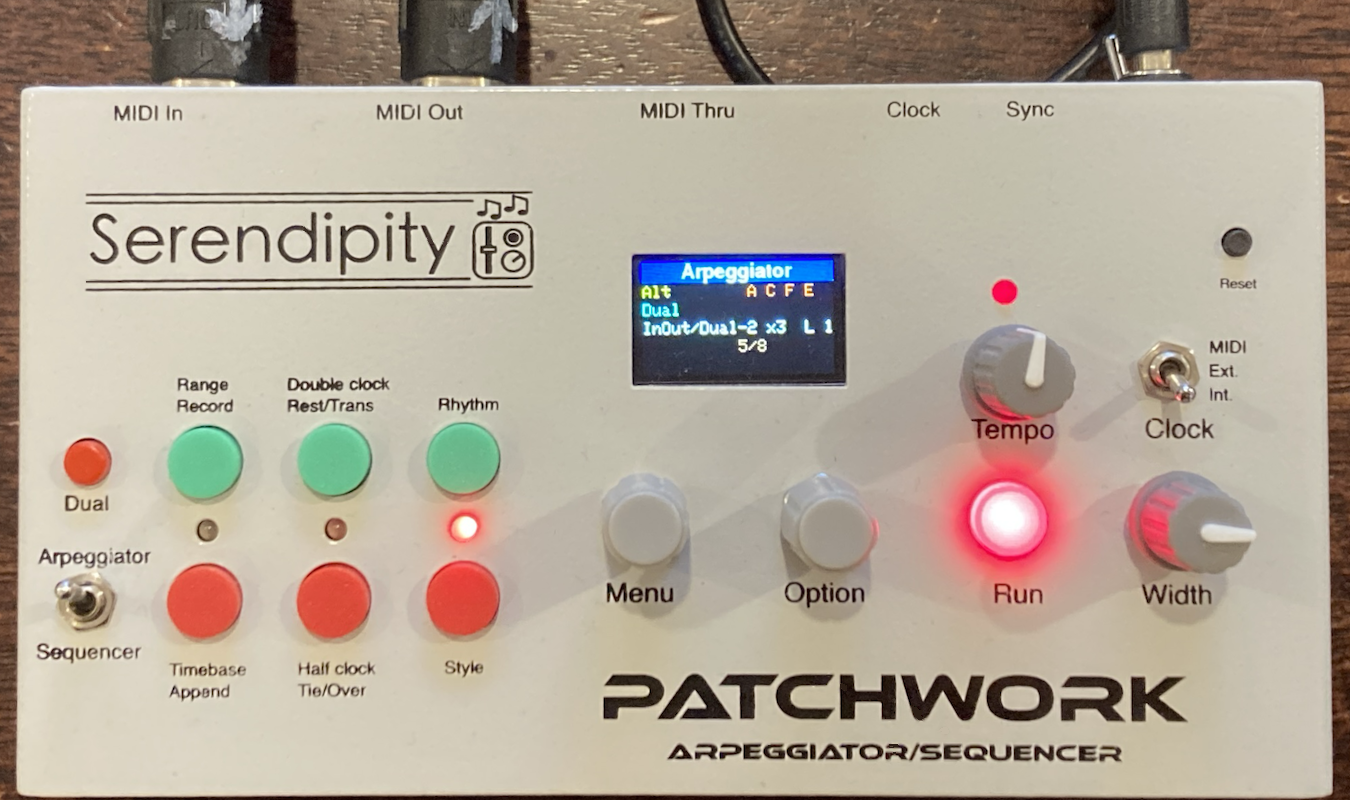
|
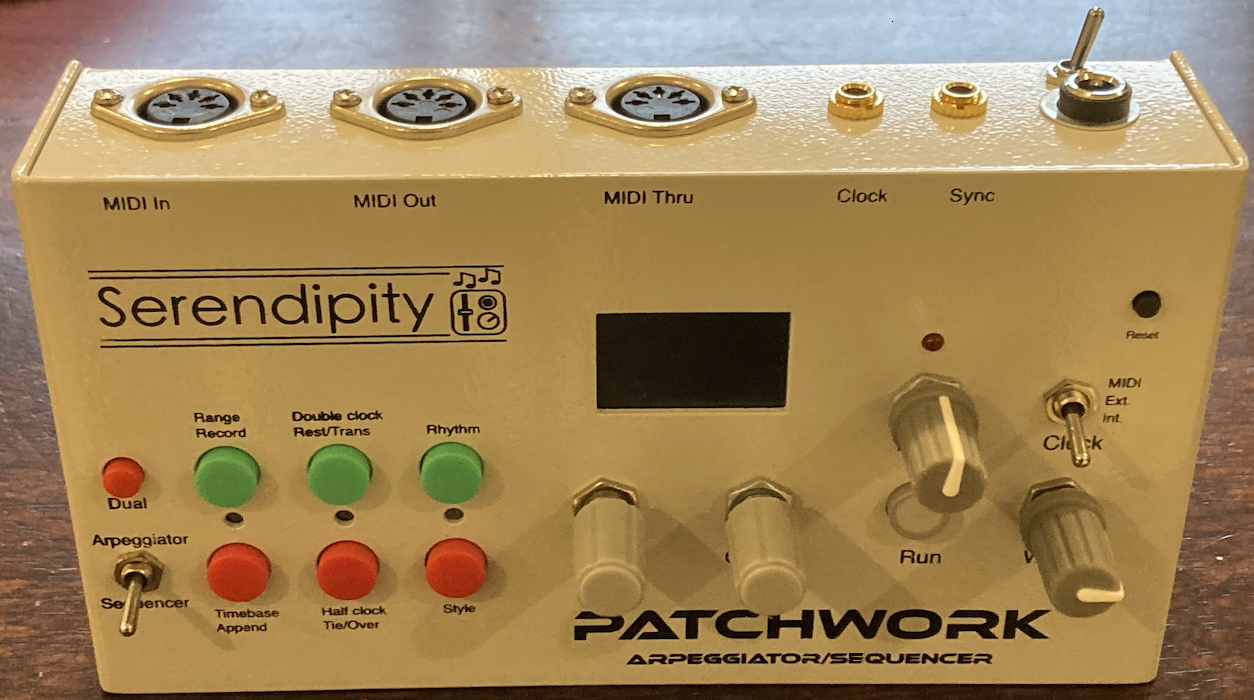
|
Patchwork is a combined polyphonic MIDI step sequencer and arpeggiator with some unique features.
Arpeggiator:
- An arpeggiator with various standard and novel patterns
- Variations of patterns
- Dual mode where a second note from the arpeggiator pattern is added (every step, ever 2nd, every 3rd or with 25% probability)
- Overplay mode where any held notes are played as held while the arpeggio continues
- Apply one or two Euclidean, anti-Euclidean and non-Euclidean rhythms to the playback
Sequencer:
- Variable play back note order: reverse, bounce, odd notes then evens, shuffle,
- Stylistic change by echoing the active note at the same octave, one octave up or down, or randomly choosing between the three options,
- Playing along with a sequence, one key transpose then return to playover, or stay in transpose
- Inversion of the sequence
- Recording a new sequence silently while the current one plays
- Apply one or two Euclidean, anti-Euclidean and non-Euclidean rhythms to the playback
Combined:
- Split keyboard with the arpeggiator at the upper end and the sequencer the lower
- Two MIDI output ports so sequences and arpeggios can go to different devices or layers.
Demo
The following video gives an overview of the basic operation.
- 1:12 Dual sequencer/arpeggiator
- 1:53 Sequencer pattern variations (like the D-Thing)
- 2:25 Echo/octave variations
- 3:50 Polyphonic sequence
- 4:38 Rests and ties
The demo is a bit rough since I was using a faulty Super Gemini. I had to quickly record and then send it back to the shop.
User Manual
Patchwork can be powered by any standard 9V, centre positive power supply, supplying at least 300mA.
Common Controls
The common controls apply to both the arpeggiator and the sequencer.
- Run
- Start and stop the automated play. When running, the button is lit red. When not running, MIDI input notes are just simply echoed back out on the MIDI channels associated with whichever mode is in operation.
- Clock
- Use this switch to select the clock source. The options are internal for the internal timer, external for clocking from pulses received at the sync input, or MIDI for clocking from an external MIDI source.
- Tempo
- Sets the play speed when using the internal timer.
- Width
- Adjust the gate length for notes, i.e. how long the note is held each step.
- Panic
- A click on the Menu encoder will stop all MIDI notes—useful should a note become stuck.
Input/Output
- MIDI
- There are 3 full size MIDI ports at the rear, labelled In, Out and Thru. The Thru port can be re-purposed as a second Out port by adjusting a jumper on the PCB.
- Clock
- Two 3.5mm sockets at the rear provide a Clock pulse output and a Sync input for external clocking.
Startup Configuration
Configuration options are accessible by holding down the Menu encoder on startup (or reset). The options available are the MIDI channels used by the Arpeggiator and the Sequencer, and the PPQN for the MIDI clock. In the current firmware it is not possible to specify the MIDI input channel. It is always channel 1.
Arpeggiator
The basic function of an Arpeggiator is taking a set of held notes, and playing them, optionally including up to 3 of each note’s higher octave equivalents, in various patterns. The Patchwork module enables you to control this process in real time, using the 6 buttons and menu options described below.
Menu Options
The Menu encoder is used to select a menu, and the Options encoder to select a value from that menu.
The available menus and options are:
- Pattern
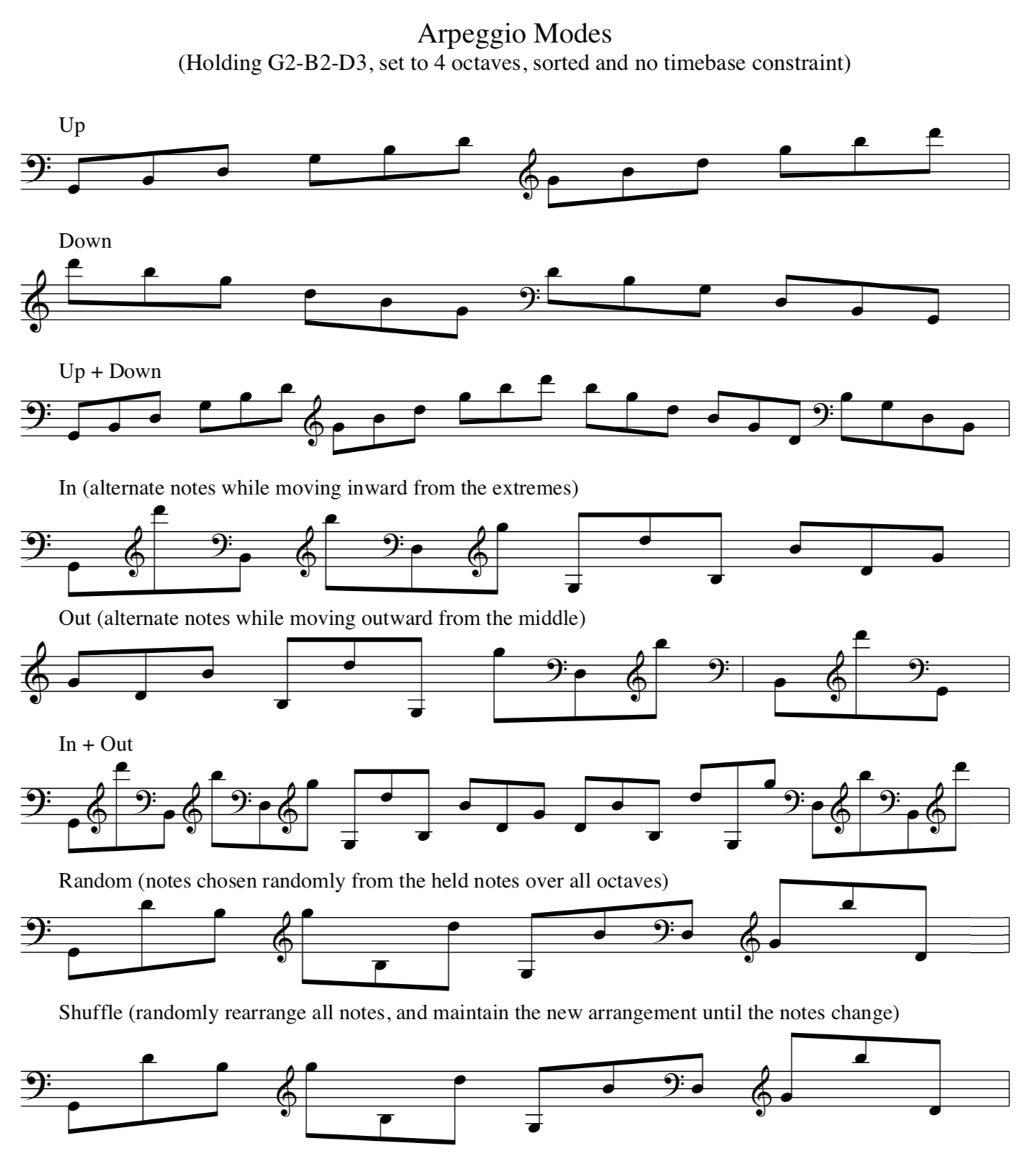
- A collection of standard arpeggiator patterns. Up, Down and UpDown are self-explanatory. Random chooses a random note each step from all available in the pattern (across all octaves), whereas Shuffle rearranges the full set of notes and repeats the same re-arrangement until selected again (like shuffling a deck of cards).
-
In is a novel pattern that sets a note order that starts
from the outermost notes and works inward, playing from high and low
sides in turn. Out sets the reverse process – starting from
the middle and playing outwards. Finally, InOut starts with
In followed by Out (analogously to UpDown).
- Alt
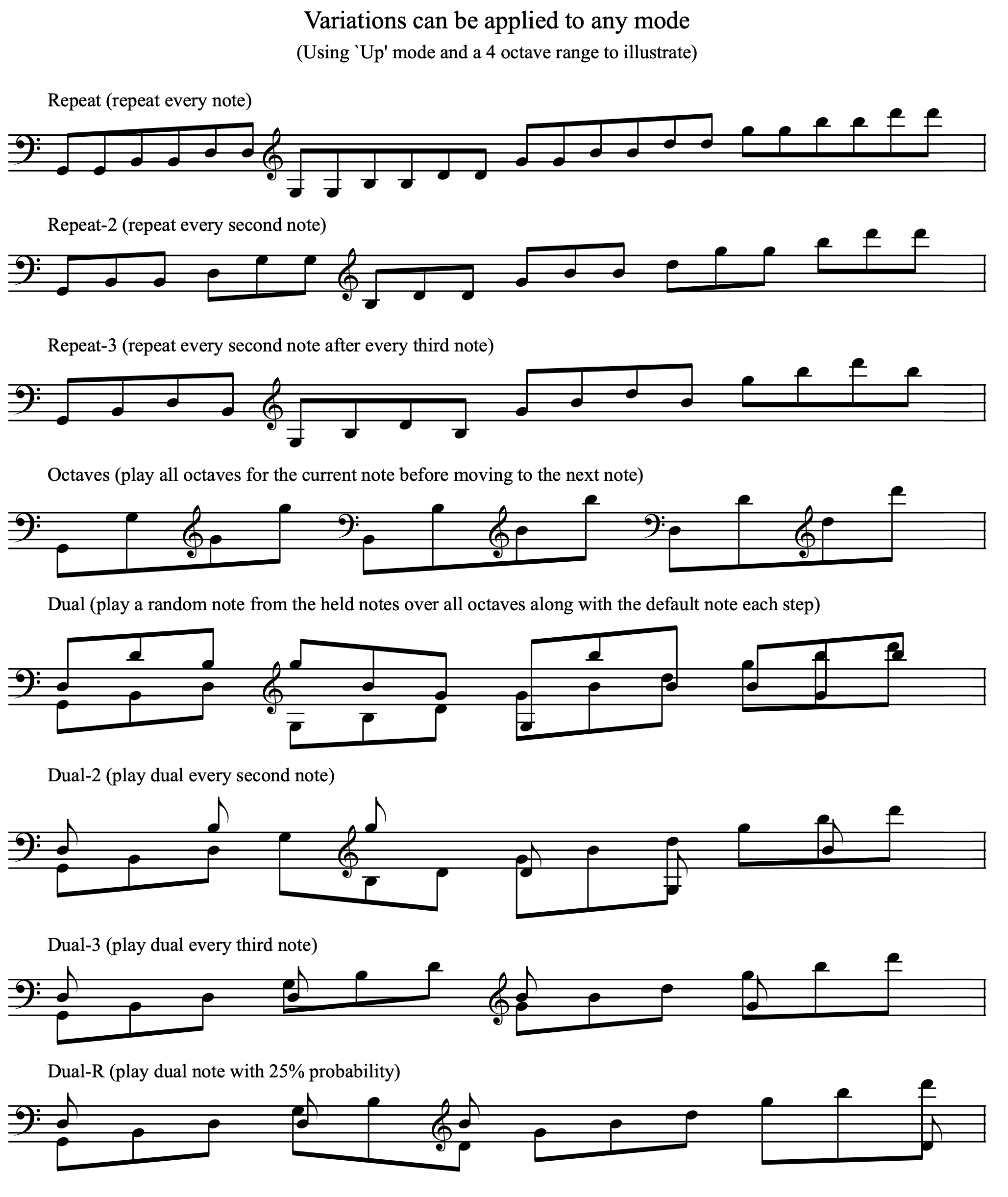
- A collection of standard variations to apply to whatever pattern is active. Double repeats every note, Double2 repeats every 2nd note, Double3 every 3rd, while Octaves plays each base note over all octaves before moving to the next note.
-
Dual plays the chosen pattern, but adds a second note,
chosen randomly from all available notes in the pattern, but with
reduced MIDI velocity. There are 3 additional variations of Dual:
Dual-2 where the extra note is played every second step,
Dual-3 where it is played every 3rd step, and
Dual-R where the extra note is played with probability 25%.
- Rhythm 1/2
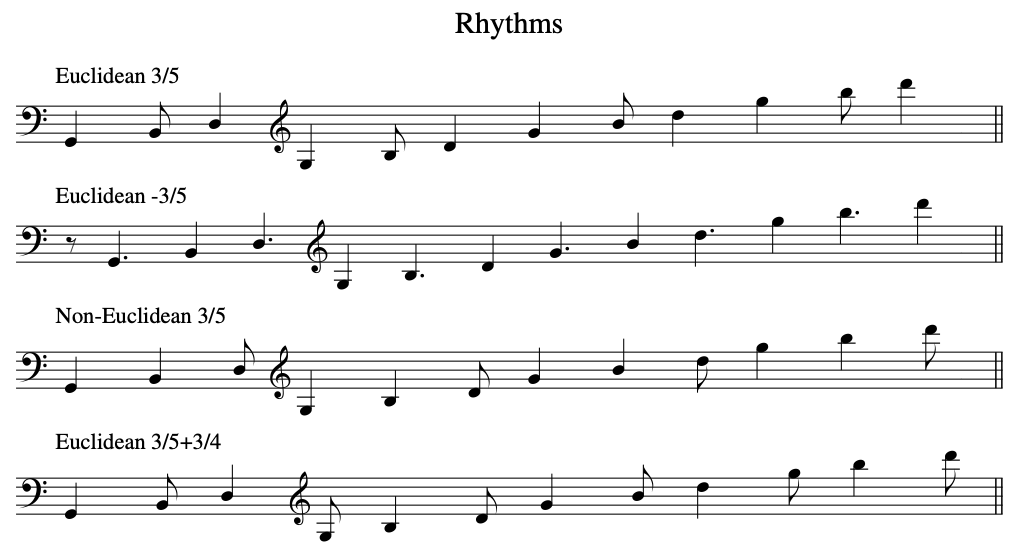
- Various rhythmic options can be assigned to the playback. The default is simply one note per clock step, but it is also possible to define 2 independent rhythms that may then be selectively applied.
- Options are shown using the notation m/n to indicate m beats in a bar of length n.
- Clicking the rhythm button (described below) controls which algorithm is employed to distribute the beats across the bar, and the negative options mean play on the offbeats instead of the beats.
Panel Buttons
- Range (1st green button)
-
The arpeggio can include the base notes shifted up to 3 octaves (for
a maximum of 4 in total). Each click of this button cycles the
range, and it is shown on the display as x1, x2, x3 and x4.
- Timebase (1st red button)
- This button is useful for when you require the number of notes in the configured pattern to be a multiple of 2, 3 or 4 notes. Each click of this button cycles this timebase through 1 (for no truncation), 2, 3 or 4, and the chosen number is shown on the LCD.
- A 5th option is shown as B, which rounds the pattern according to the chosen rhythm (see below).
-
Additionally, when the timebase is not 1, an accent is applied to
the starting note each timebase cycle.
- Double clock (2nd green button)
-
Clicking this button will cause the arpeggio to play double speed,
but only at the completion of the current cycle. A second click will
restore the original clock speed in the same way. The LCD will show
Clk*2 when the speed is doubled, or when the speed doubling
is pending by Clk….
- Half clock (2nd red button)
-
Clicking this button will cause the arpeggio to play hald speed, but
again only at the completion of the current cycle. A second click
will restore the original clock speed in the same way. The LCD will
show Clk/2 when the speed is halved, or when the speed
halving is pending by Clk….
- Rhythm (3rd green button)
- Clicking this button will toggle on or off the currently configured rhythm (as shown on the LCD).
-
A long press will switch between Euclidean rhythm 1, non-Euclidean
rhythm 1 (indicated by an asterisk and has longer beats played
first), or a combination where rhythm 1 is immediately followed by
rhythm 2.
- Style (3rd red button)
- A click will control L for latched and H for held order (vs pitch order) for the base notes. A long press will invert the currently defined rhythm, so off-beats are played.
- Additional long presses will also enable or disable overplay mode (indicated by an O on the display). Overplay is a unique aspect of the Patchwork arpeggiator, and, when enabled, causes the held notes to sound even as the arpeggio is playing. The net effect is the ability to play something while simultaneously have it arpeggiated.
Illustrated Examples
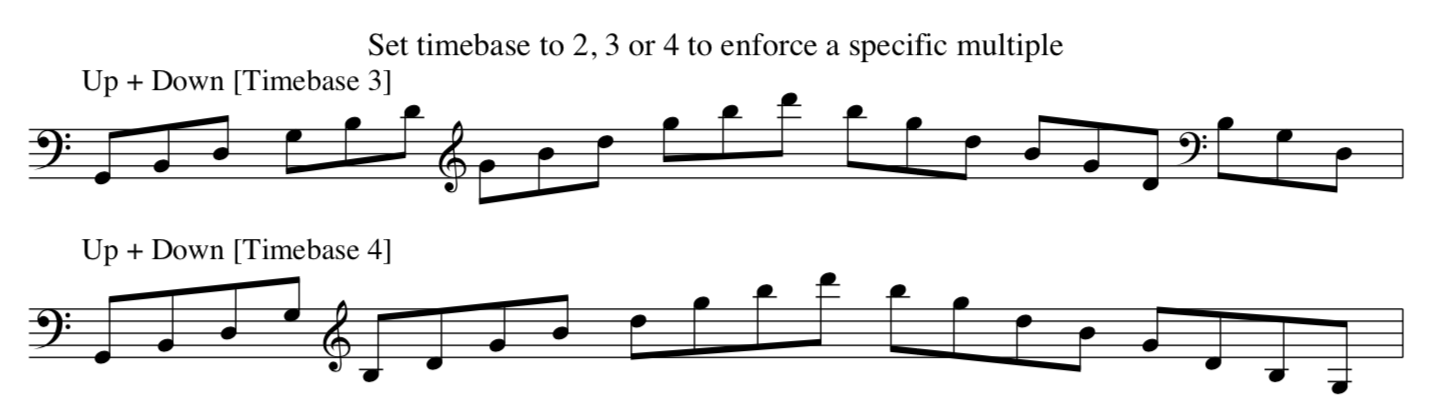
Sequencer
The Sequencer lets you record notes aligned to steps, including rests and ties, with up to 4 notes of polyphony. You can play over a running sequence, change the order of the recorded notes, transpose it, assign various rhythms, and more.
Panel Buttons
- Record (1st green button)
- Press this button to record a new sequence. When recording, the corresponding LED will light red, and the display will show both the number of recorded notes, and the beat length of the entire sequence.
- If the sequencer is currently playing, the recorded notes will not sound, but the display will still show the progress. Click again when complete, and the new sequence will begin when the current one finishes.
- It is not possible to edit recorded notes, but a long press will delete the last note of the sequence, and additional long presses will continue deleting.
-
Polyphony of up to 4 notes is supported.
- Append (1st red button)
-
Press this button to record additional notes onto the end of the
current sequence.
- Double clock/Rest/Trans
(2nd green button) - When recording, a press of this button will add a single step rest to the sequence.
- When the sequence is playing, a press of this button will turn the assocated LED green, and the next note played will transpose the sequence. The display will show T+/-n to indicate the nuber of semitones transposed. Subsequent notes will simply play as normal.
- A second press will cause the transpose adjustment to remain in place, so each note played will update the sequence transpositon.
-
A long press on this button will double the playback speed in the
same way as for the arpeggiator.
- Half clock/Tie/Over
(2nd red button) - When recording, a press of this button will extend the previously recorded note by an extra step.
- If playing and set transpose is active, then a press will return to note overplay mode.
-
A long press will halve the playback speed in the same way as for
the arpeggiator.
- Rhythm (3rd green button)
-
Use this button to apply a rhythm to the sequence playback in the
same way as for the arpeggiator.
- Style (3rd red button)
- Pressing this button will toggle the reflect mode of the sequence.
- A long press will invert the currently defined rhythm, in the same way as for the arpeggiator.
Menu Options
- Pattern
- This menu allows you to change the playback order of the recorded notes in a sequence.
-
Normal plays the notes in the order they were recorded,
Reverse plays the notes from last to first, and
Bounce alternates between these two. Odds+Evens
plays through all the odd indexed notes first, then the even ones,
and Shuffle rearranges the notes and repeats the same
re-arrangement until selected again.
- Alt
- This menu allows you to choose between a collection of note repeat options.
-
Echo down repeats each note an octave down, Echo
simply repeats the note, and Echo up repeats it an octave
higher. Rand oct is like a combination of all three, with
the octave of each repeated note randomly chosen between the three
options.
- Length
-
The recorded sequence can be truncated by selecting a length using
this menu. Truncated notes are not deleted, but will be removed from
playback until restored by selecting an inclusive length in this
same way.
- Rhythm 1 / 2
- The two rhythm menus operate in exactly the same was as for the arpeggiator.
Illustrated Examples


Dual mode
Dual mode allows the arpeggiator and sequencer to run simultaneously, and is toggled on and off by hitting the Dual button.
When Dual mode is active, the header background on the display is light blue, while the controls and display are associated with whichever mode is selected by the toggle switch.
A split point, shown at the bottom right of the display, determines the routing of incoming MIDI notes, with notes below the split point handled by the sequencer, and those above by the arpeggiator. A long press of the Dual button will highlight the shown split point in yellow, and the next note played will become the new split point.